Connect your IBKR account
Connecting IBviz to Interactive Brokers takes about 2 minutes and requires no software installation.
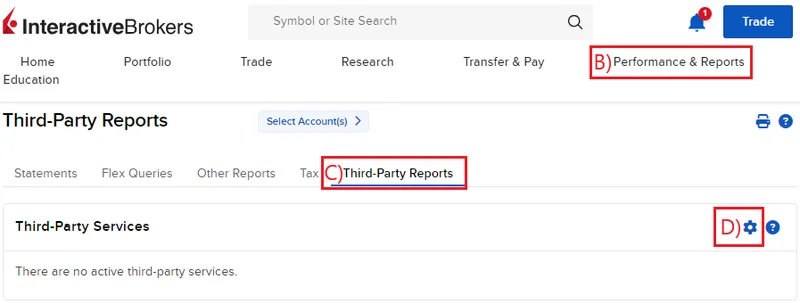
Step 1: Go to Third-Party Services in your IBKR portal
A) Log into your IBKR portal
B) Select Performance & Reports
C) Select Third-Party Reports
D) In the Third-Party Services section, click the Configure icon at the top right
Step 2: Activate tokens for IBviz by Utluna
A) Check the box next to Utluna
B)Click Save
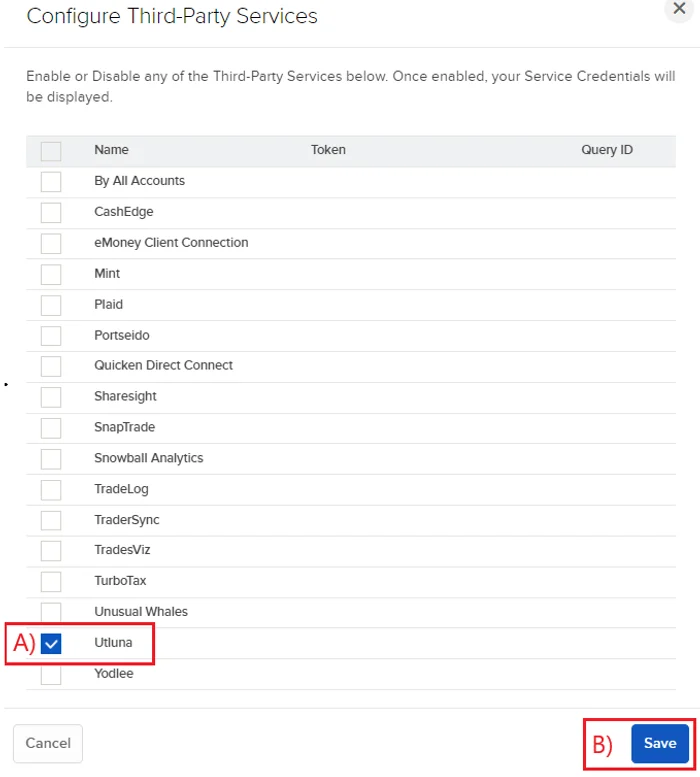
Step 3: Copy your tokens
A) Copy your Token and Query ID

Step 4: Link account to IBviz
A) Go to IBviz → Transactions → Linked Accounts
B) Click Link new account
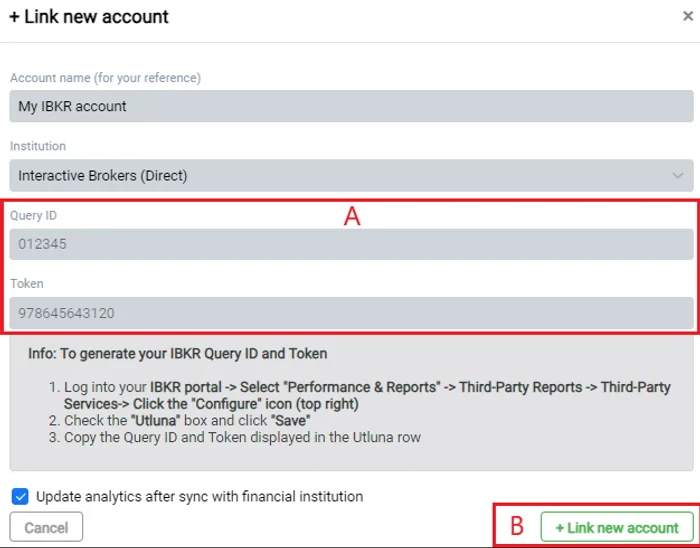
Step 5: Input your tokens in IBviz
Optional: You may edit the account name for your own reference
A) Paste your Token and Query ID in the corresponding fields
B) Click Link new account
IBviz will begin importing your portfolio history. Visualizations are typically available by the next business day after your initial sync.
After the initial sync, your portfolio updates automatically every day. Additional updates can be triggered manually by the user.